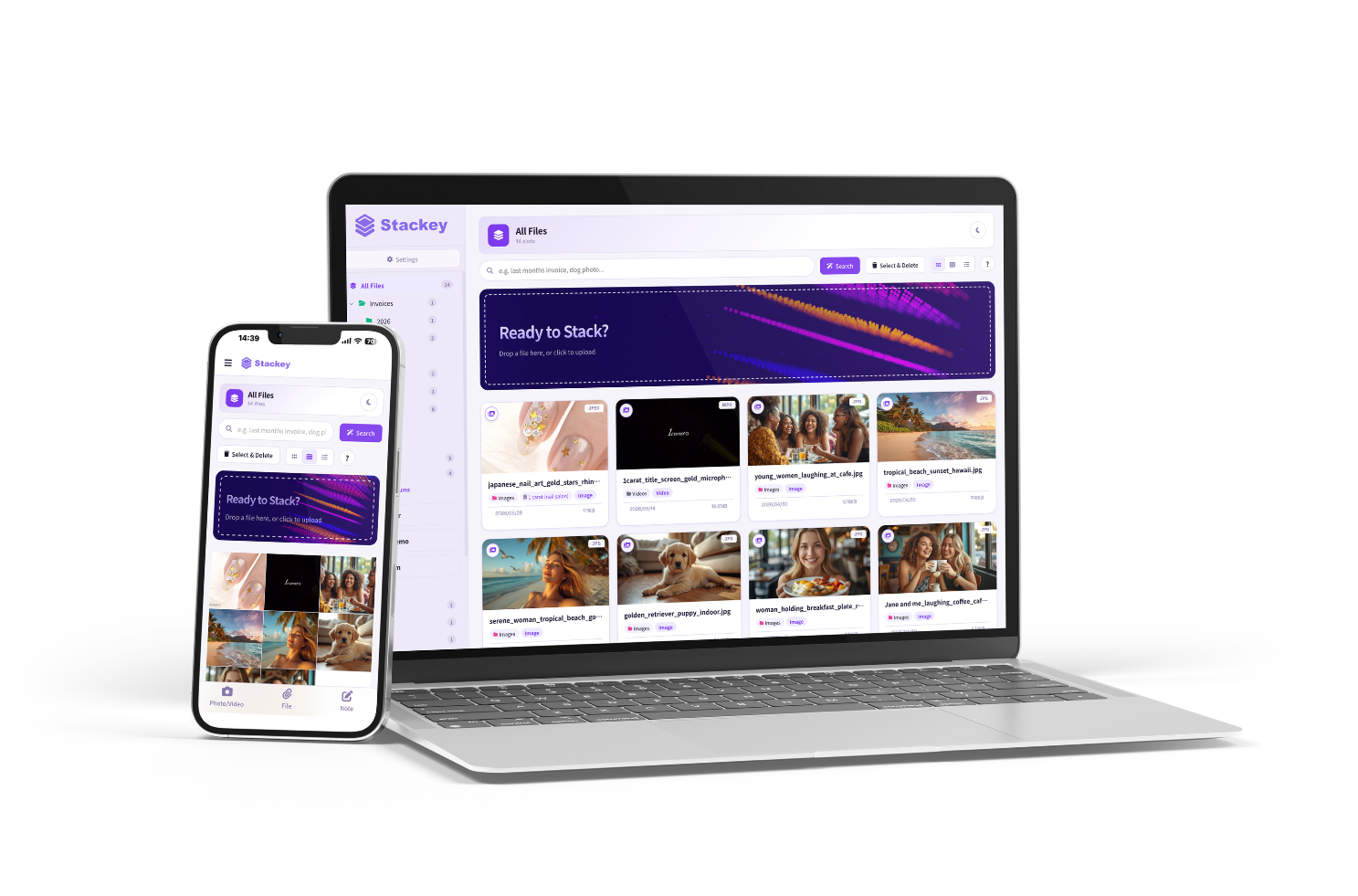
The dream pocket storage.

Drop in your moments
and your paperwork. That's all.

Like magic, it's there the moment you need it.

Try your first 10 files free → See how it works

Try your first 10 files free  ·  No credit card  ·  No setup
Runs in your browser. Mac, PC, tablet, phone — all supported.

Video, audio, and ZIP supported · Up to 5 GB per file

Nine things you
won't find elsewhere.

LINE Drop — auto-named, sorted, and understood the moment you send
Search by memory — "the beach photo from summer" finds it instantly
No folders. No filenames. — you never organize again
Memos the moment they strike — type or speak, right there
Voice memos — automatically titled from what you said
See it. Hear it. Watch it. Send it. Without opening.
Multilingual auto-summary — any language inside, your language on top
Same on every device + 6-digit LINE login — PC, phone, tablet — no email, no password
Web UI = Mobile UI — same look, same feel, any device
NEW · LINE DROP

Stackey with LINE Drop
is here.

Photos, videos, screenshots, notes.
Naming, summarizing, and search — all handled automatically.

What flows through LINE,
kept on Stackey.

For individuals, salons, shops, field teams, and sales.

Become friends with Stackey

Sign up in seconds. Send a file in LINE chat, and it's kept on Stackey.

Three things that happen automatically

Drop it in. Stackey takes it from here.

No naming. No folders. No more thinking.
The moment you save a file, it's renamed, sorted, and ready.

01
Auto
rename.

"IMG_4521.jpg" becomes "Spring_Walk_With_The_Dogs.jpg". "document_final_v3.pdf" becomes "Contract · $1,000 · 2026/03". Stackey reads what's inside and gives it the right name — automatically.

IMG_4521.jpg
→ Spring walk — dogs at the park.jpg
02
Auto
sort.

No folders to create or choose. Receipts to receipts. Photos to photos. Contracts to contracts. The moment you save, it's in place.

Desktop chaos
→ Invoices / 2026 / March
03
Auto
classify.

Receipts, invoices, contracts, photos, videos — identified instantly. Dates and amounts extracted automatically.

document_final_v3.pdf
→ Contract · $1,280 · Mar 2026

Find it,
in an instant.

Always at your fingertips — like a secretary who remembers.
3,000 files, 5,000 files — "Where did I save that?" never happens again.

Stackey app screen
What you can do — without opening

Without opening,
you know. Hear. Watch. Send.

PDF, Word, Excel, PowerPoint, images — you know what's inside without clicking.
MP3, MP4, MOV — play right where they sit. Up to 5 GB.

Video and audio,
play right here.

MP3, MP4, MOV — play right where it sits. No download. Files up to 5 GB stream in full. And voice messages from WhatsApp, Slack, or LINE? Stackey listens, understands what was said, and gives the file a name that means something. Voice memos, meetings, video footage — no need to open anything.

golf_swing_2026.mp4 (245 MB) → upload failed
→ Video and audio up to 5 GB. Saved instantly.
1:24 / 4:02
Golf_Swing_Driver_Practice.mp4 Video
2:103:26
Birthday_Decoration_Plan.m4a Audio
Preview Adobe Illustrator files
without Illustrator.
Preview screen

Adobe Illustrator files are previewed too — without launching Illustrator. PDFs, images, Word, Excel, PowerPoint: just scrolling, you sense what each one is. For creative teams, no more waiting.

No Illustrator installed → can't see inside → "Can you resend as JPG?"
→ Just drop it. Thumbnail and summary, instantly.
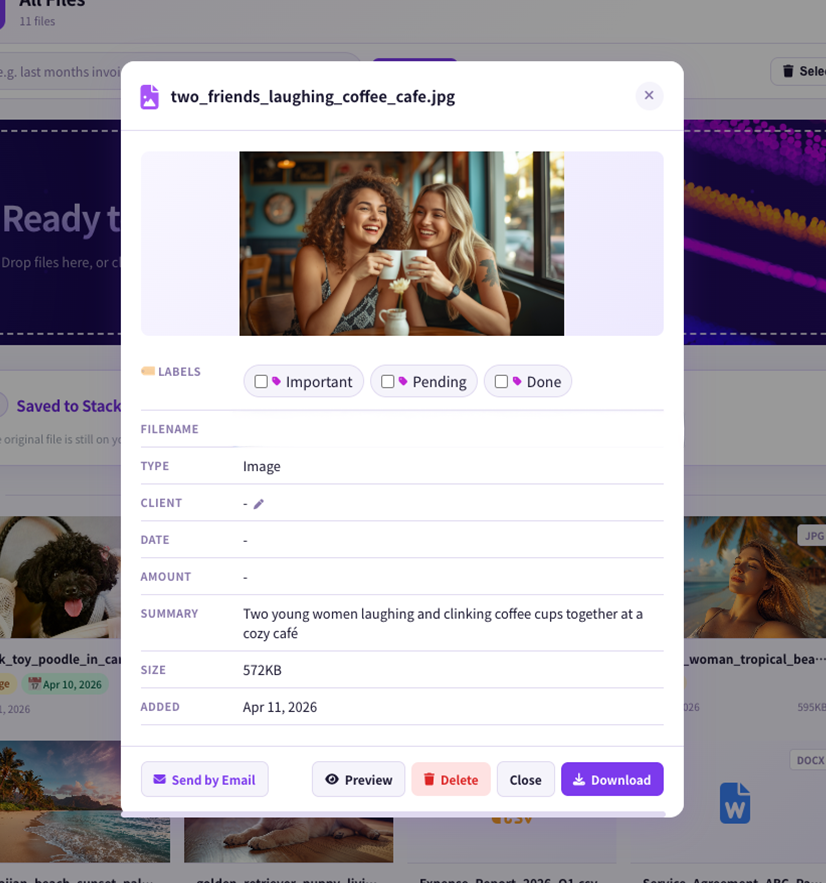
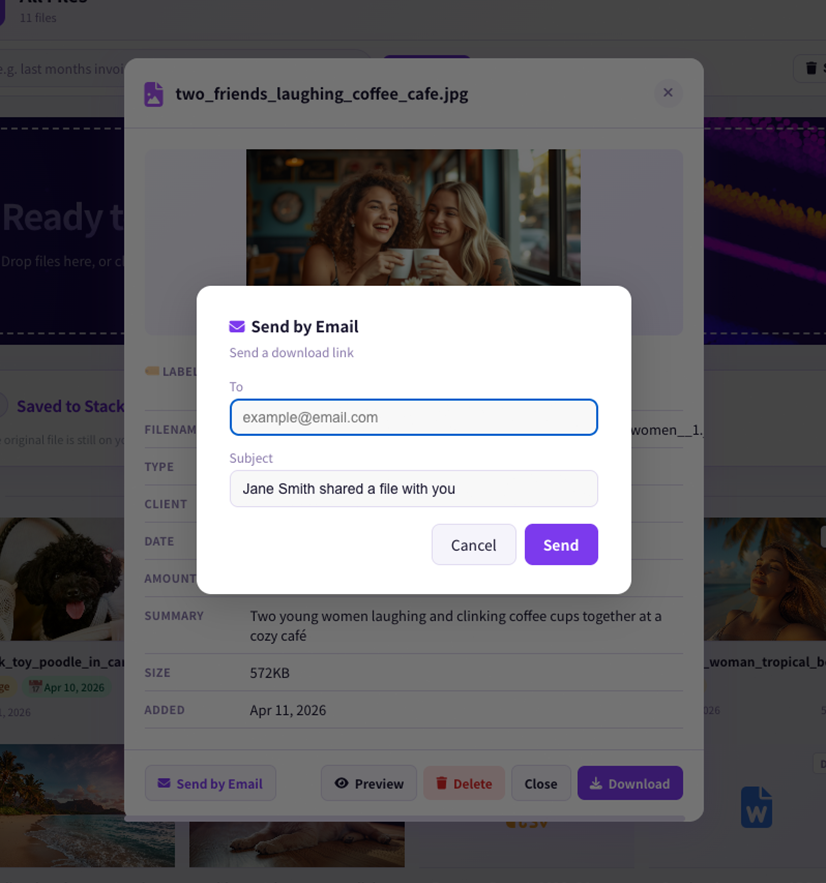
Send by email.
One click.
Send by email screen

Stay on the preview screen and send with one click. No mail app to launch. No subject to write. Type the recipient. Hit send. That's it. The recipient sees a clean email — your name, the file name, and an "Open File" button.

Copy link → open email app → paste → send
→ Click "Send" → done.
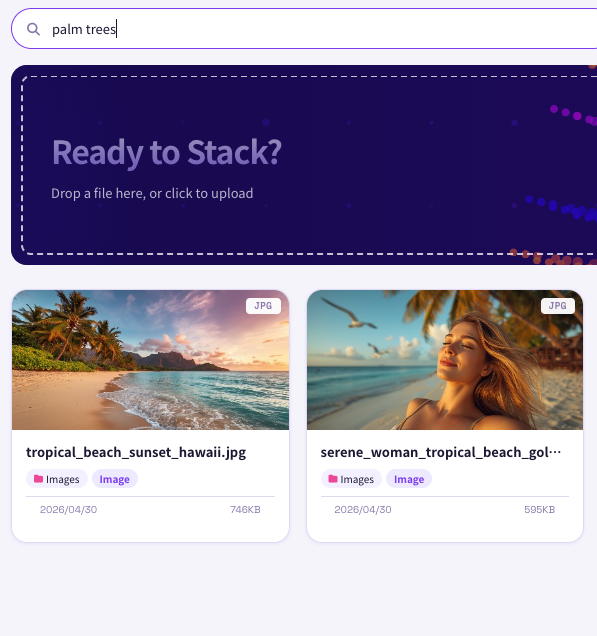
Memory search.
Find it in an instant.
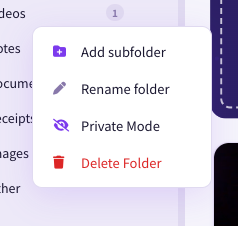
Subfolder feature

You don't search by file name. You search by memory. "That contract from last spring, the company with the blue logo." "The invoice I sent Amy last month." Speak in fragments of memory, and Stackey finds it in seconds.

3,000 files. 5,000 files.
→ "Where did I save that?" never happens again.

It doesn't matter what
language a file is in.

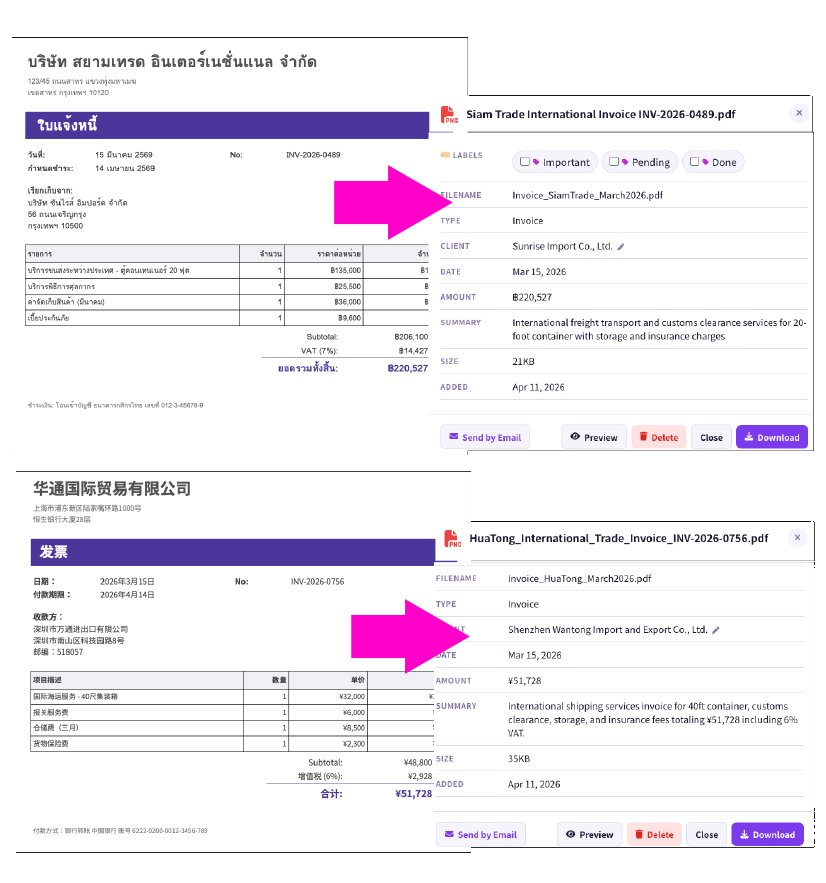
Drop in a Thai invoice, and it's saved as "Somchai Co._Purchase Invoice_฿45,000_March 2026.pdf" — in your language, with key details attached.
The original stays untouched. But you search in your language, with your memory.

Before
invoice_somchai_march.pdf
Thai supplier invoice, unreadable filename
After
Somchai_Invoice_฿45,000_Mar2026.pdf
Named, sorted, summarized — in your language

Works in any language. Saves in yours.

Multi-language invoice analysis

Stackey Web,
one app for every device.

Stackey Web is a PWA built for PC, tablet, smartphone, and LINE.
Open it in your browser, or add it to your home screen or Dock to launch like a native app.
No downloads. No installations. Always the latest Stackey.

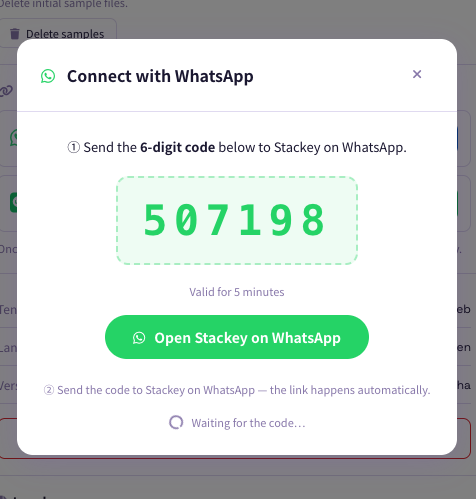
Sign in to your PC with a 6-digit code from LINE

Sign in with LINE.

If you use Stackey on LINE, signing in on your PC is effortless.
No email, no password.
Just send the 6-digit code shown on your PC to LINE.

(You can also sign in with Email, Google, or Apple.)

Think it.
Type it. Or say it.

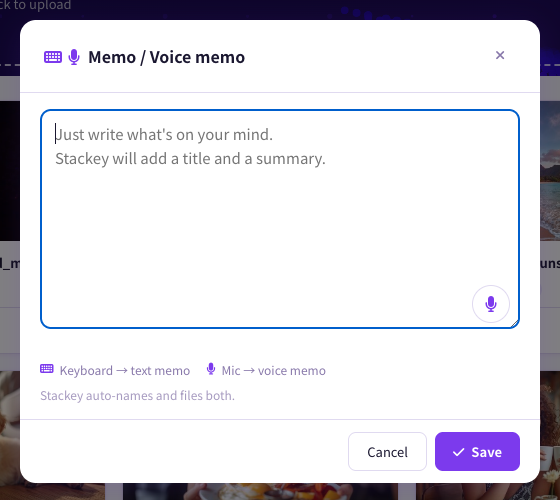
Whatever comes to mind — type it or speak it out loud.
Stackey writes the title, the summary, and files it away.

Forward a text to yourself on LINE — it lives here as a memo too.
"I'll write it later" stops disappearing.

Write a memo

In your words.
In your way.

Stackey gets things in order, on its own. But when a title doesn't quite fit,
rewrite it. Teach Stackey the names that matter to you.
Choose the quality that suits the moment.

01
Titles and summaries,
in your own words.

When the auto-generated title or summary isn't quite right, rewrite every character. "Mom's birthday flowers." "Contract — Suzuki-san." Whatever helps you find it later, that's what it becomes.

02
Family, pets, friends —
remembered by name.

Register the people and pets you love, and Stackey writes them into titles and summaries the moment they appear. Not "a black dog" but "Coco." Not "with a friend" but "with Miki." Search later, find instantly.

03
Quality,
your call.

Standard (Full HD) / High (4K) / Original for photos. 720p / 1080p / Original for videos. Keep family memories at full resolution; keep daily notes light.
For both photos and videos: Standard = 1 / High = 2 / Original = 4 toward your plan count.

See it without opening.
Find it without remembering.

Quick Look that lives in the cloud, names your files for you,
and remembers your searches. That kind of place.

01
See it without opening

PDF, Word, Excel, PowerPoint, video, audio, photos, Adobe Illustrator — preview them right inside Stackey, no native app required. Thumbnails are generated automatically the moment you drop a file in.

02
Find it without
remembering

"the design with the blue cover," "last month's restaurant receipt." Search by memory, not by string match.

03
Drop it. It's organized.

Filename, document type, client, summary — generated automatically the moment you drop a file in.

04
Use it, right there

Open, check, email it. No app switching — the whole flow lives in one screen.

05
No language barrier

A Japanese invoice, a Chinese menu — whatever language the file is in, Stackey saves a summary in yours. No more lost-in-translation.

On every platform.
On every device.

Same experience. Same files. Phone, tablet, PC — all in sync.

Or start right now in your browser: app.stackey.me

iOS, Mac and Android: official launch June 1, 2026.

Simple pricing.
Ridiculous value.

Starts at the price of one lunch a month.
Upgrade when you're ready. Cancel any time.

Stackey is your personal file secretary —
quietly ending the daily "where did I put that?"

* Files are encrypted and kept secure. Payments are securely handled by Stripe.

All plans include auto-rename, auto-sort, auto-classify, smart search, and video & audio playback.
Trial
$0/mo
10 files

Up to 10 files. No credit card. No commitment.

  • Auto-rename
  • Auto-sort
  • Auto-classify
  • Memory-based search
  • 1 user
Start for free

First-time only · No credit card

Light
$7.99/mo
800 files

For the price of a lunch a month: end the search stress and storage anxiety. Lighter days.

  • Auto-rename
  • Auto-sort
  • Auto-classify
  • Memory-based search
  • Guest passes 3/month
  • Plus add-on available
  • 1 user
Start Light Try free Trial first
Best for business
Business
$44.90/mo
5,000 files

Up to 5,000 files. Small businesses, importers, creative teams.

  • Auto-rename
  • Auto-sort
  • Auto-classify
  • Memory-based search
  • Guest passes 10/month
  • 5,000 files (plenty for business volume)
  • 1 user
Start Business Try free Trial first
Plus
Need more room? Add 1,000 files at a time, whenever you need it.
$9.90/mo
per 1,000 files
Start for free first

The free trial is available once per account. Plus can be purchased on Light, Everyday, or Business plans.

What's happening.

2026.05.14
Voice messages, named for you — Drop a WhatsApp, LINE, or Slack voice note. Stackey listens, understands, and gives it a real name. No more "AUD-2026-05-14.m4a".
NEW
2026.05.11
LINE Drop released — Send a photo, video, or PDF in LINE chat, and it's saved to Stackey. The rest happens automatically.
Live
2026.05.08
Windows version released — Now available on the Microsoft Store.
Live
2026.05.02
macOS version coming soon — Available on the Apple App Store.
Soon

Three quick answers, in case you're new to cloud storage.

Can I delete the original after sending?
Yes — Stackey copies it into your private vault the moment you send.
Where does my file actually go?
Into a vault only you can open. Not even Stackey's operators can look inside.
Can I get it back in its original form?
Anytime — photos stay photos, PDFs stay PDFs. One click and the original is back.

Trusted infrastructure.
Built for keeping things safe.

Stackey runs on secure, encrypted infrastructure trusted worldwide.
Every file traveling from you to Stackey is fully encrypted. We never sell your data. Deleted files are deleted, completely.

Step away from organizing.
Stackey has it.

No credit card. No setup. Open in your browser.

Try your first 10 files free →